

 TradingView is a powerful platform for researching with extensive historical depth and performing technical analysis. However, it is designed for analysis and signal generation, rather than direct trade execution. As a result, deploying a trading robot on TradingView requires a connection to an external brokerage server. In practice, a trading robot on TradingView operates as part of a distributed system, as briefly outlined in this tutorial.
Connecting to a Broker or Exchange
Since TradingView does not execute trades directly, running an Expert Advisor requires integration through one of the following options:
• Broker APIs (a list of Forex brokers that partner with TradingView is provided below)
• Third-party services (automation platforms such as 3Commas, Autoview, or custom-built servers)

Creating and Operating a Trading Robot in TradingView - Step by Step
The following tutorial outlines the core steps required to build, backtest, and operate a trading robot on TradingView that executes trades through a broker.
1. Defining Trading Logic
The first step is to define the trading logic of your Expert Advisor clearly. TradingView performs three key functions:
- Defines trading logic (conditions for opening and closing trades)
- Backtests performance using historical data
- Triggers alerts, which are then sent to a broker’s API
In this first step, you must define precise market conditions under which your Expert Advisor will open, modify, or close trades. If the logic cannot be expressed as clear, unambiguous rules, automation will fail. Define the strategy in text and simple formulas before converting it to code.
2. Defining Money Management
Without strict money management, even a strong strategy will fail in live conditions. Therefore, the next step is to define money management, which includes:
- Risk management
- Position sizing
- Hedging
- Time filters and fail-safes
Avoid the following common mistakes:
• Lack of drawdown control
• No maximum trades per day
3. Converting the Strategy into PineScript
TradingView strategies are written in PineScript v5. You can code the strategy directly within TradingView, or use an external development service if you lack programming experience.
Key points:
- Implement fixed or dynamic position sizing
- Avoid repainting and any future-looking logic
Avoid the following common mistakes:
• Applying the same strategy across all markets
• Ignoring spreads and commissions
• Ignoring scheduled news releases

4. Backtesting Rigorously on TradingView
Backtesting is an essential step for ensuring the good performance of your Expert Advisor. Do not proceed to automation unless the strategy delivers consistent and robust backtest results. With TradingView’s Strategy Tester, you will be able to evaluate:
- Historical Performance
- Drawdown (%)
- Win rate (%)
- Profit factor
- Trade frequency
- Slippage assumptions
Key points:
• Test across extensive historical data and multiple market conditions
• Validate performance on different timeframes, symbols, and volatility conditions
• Avoid over-optimization and curve fitting
5. Creating and Setting Up a Webhook Receiver
The webhook receiver is typically built using Python, Node.js, or C#. It performs the following functions:
- Receives TradingView alerts
- Validates signals and applies risk management rules
- Calculates position sizes
- Sends orders to the broker’s API
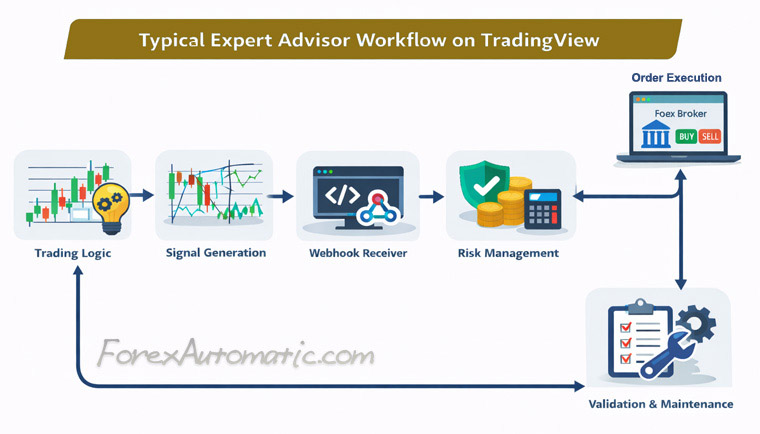
Typical Expert Advisor Workflow on TradingView
□ Trading Logic ⇒ Signal Generation ⇒ Webhook Receiver ⇒ Risk Management ⇒ Order Execution on Forex Broker ⇒ Validation and Maintenance
6. Selecting Brokerage Integration (Connecting Signals to Execution)
As mentioned earlier, if you plan to deploy an Expert Advisor on TradingView, you have two primary integration options:
Option A - Connect to a Broker’s Server
Supported Forex brokers include:
• FXOpen
• Other brokers include Pepperstone, ActivTrades, Tickmill, OANDA, FOREX.com, FxPro, Eightcap, CMC Markets, Tradu, FXCM, and Interactive Brokers
Option B - Connect to 3rd-Party Automation Platforms
TradingView can also be connected to automation platforms such as:
- Alertatron
- PineConnector
- AutoView
7. Connecting the Webhook to the Broker’s API
Once the webhook is operational, it must be integrated with the broker’s official API:
- REST or FIX protocols (REST is sufficient for most use cases)
- Authentication via API keys or OAuth
- Core functions: place orders, close orders, query positions
- Handling market vs. limit orders and broker-specific symbol mapping
Potential execution issues that must be handled include:
- Order rejections
- Partial fills

8. Testing and Maintaining the System
To ensure 24/7 operation, deploy the system on a VPS or cloud infrastructure (AWS, DigitalOcean, etc.). Ongoing responsibilities include:
- Daily log monitoring
- Emergency kill-switch implementation
Ongoing validation requirements:
- Latency monitoring
- Order accuracy and position synchronization
- Error handling and recovery
- Pine Script version updates
- Broker execution or API changes
Any change in the environment must be detected and addressed immediately.
Professional Trading Robots
Professional trading robots incorporate the following features:
- Adaptive logic across markets and timeframes
- Trend and volatility filters with selective execution
- Spread and commission filtering
- Advanced risk management and automated kill-switches
□ Preliminary Steps for Building a Successful Trading System
G.P. for ForexAutomatic.com (c)
Janury, 28 2024
 READ MORE ON FOREX AUTOMATIC
